


Knowing how to choose the right graphics card today isn’t about chasing the highest number on the box, it’s about finding the perfect balance. Modern cards are complex systems where everything from memory type to cooling is crucial. After all, you want to pay for a smooth image in your monitor, not theoretical performance that the rest of your build can’t take advantage of. How to not get lost in the shuffle and choose exactly what you need? We’ve summarised all the essentials for you in the clear infographic below. Check it out and then read the details that will determine your satisfaction.

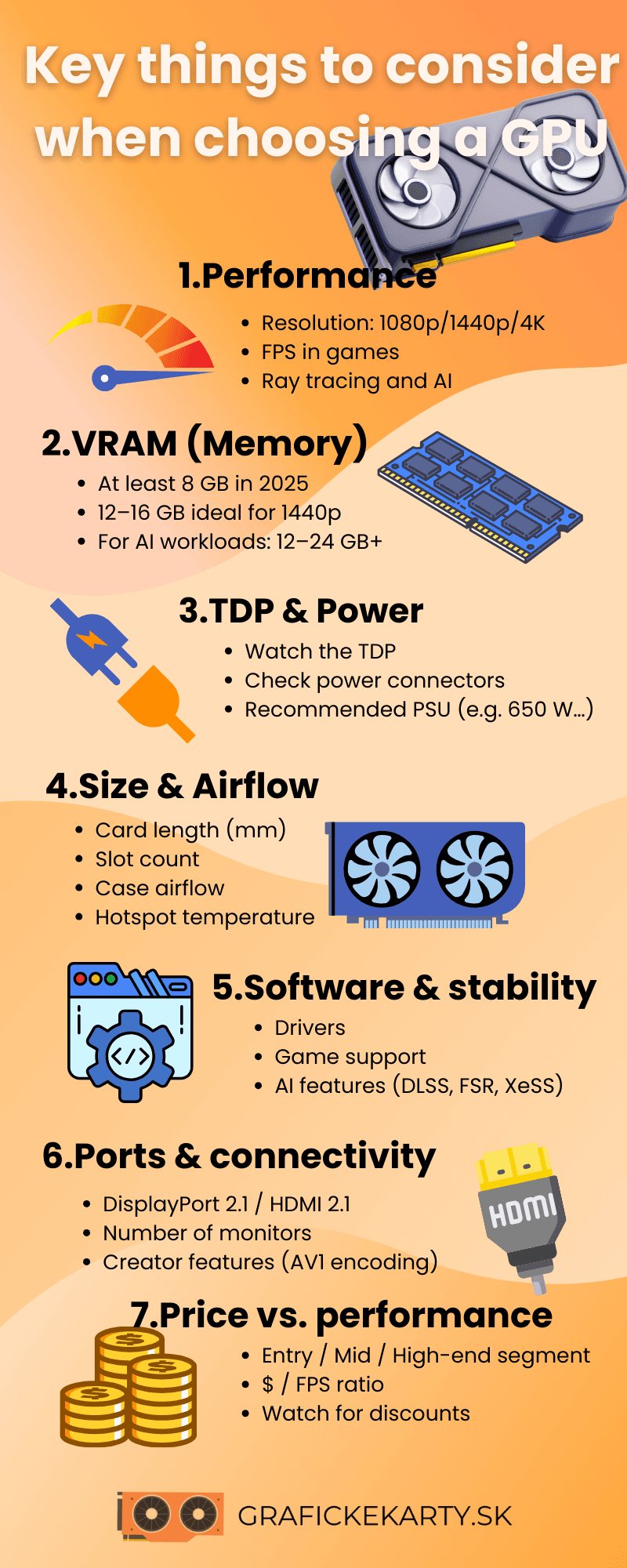
The most important parameters for graphics cards in 2026
When choosing a graphics card, it pays to look at the specs that will most affect performance, temperatures and compatibility. Each model has different limits, and it’s the basic parameters in the spec sheet that will quickly show you if the card can handle your games, monitor and build. Following are the review points that gamers watch most often.
VRAM, memory type, and bus width – Memory is one of the first specs you’ll notice when making a purchase. For 1080p, 8GB is sufficient, for 1440p we recommend 12GB, and for 4K, 16GB or more is the minimum. Memory type (GDDR6 / GDDR6X / GDDR7) and bus width are also important. Together they determine throughput, which affects performance at higher resolutions. Narrow 128-bit solutions can be a limitation in demanding games.
Core and boost frequencies – The core and boost frequencies determine how fast the card operates under load. Higher boost means better performance, but only if the heatsink can maintain stable temperatures. Poor cooling lowers frequencies and slows the card down.
TDP and recommended power supply – The TDP tells how much heat the card will generate and what its power supply requirements are. Higher TDP means higher power draw, more heat, and the need for a more powerful PSU. Manufacturers often provide recommended values that are worth following, especially for powerful 12GB – 16GB models.
Cooling and Noise – Passive size, number of fans and bearing quality directly affect performance stability. More massive heatsinks are quieter and maintain lower temperatures. Smaller dual-fan models tend to be noisier and hotter, which can lead to lower boost.
Dimensions, connectors, and PCIe version – These three parameters are closely related. Modern GPUs are often long and tri-slotted, so make sure you check if they will fit in your case. Also check the power connectors – older models use 6-pin/8-pin, newer ones are switching to 12V-2×6. This includes the PCIe version as well. Most cards run on PCIe 4.0, but in older motherboards with PCIe 3.0, performance may drop slightly for cards with large VRAM.
How to choose the right graphics card ?
Choosing a graphics card looks complicated, but there are a few obvious questions that decide the choice. First, be clear about the resolution of your monitor and the performance you expect from your card in games. Then look at the hardware you have at home to ensure you don’t buy performance that is hampered by an older processor or motherboard. Finally, consider practical features such as noise, power consumption, heatsink size or preferred brand. Knowing these three things will help you avoid disappointment and choose a card that fits both your build and your budget.
By output resolution: 1080p, 1440p and 4K
The resolution of your monitor will have the biggest impact on how much performance you’ll need from your graphics card. The more pixels the GPU needs to render, the faster the core, VRAM and memory bus need to work. Therefore, it pays to start with the resolution you are using or plan to use.
- 1080p – The least demanding resolution that even a mid-range GPU can handle. All you need is 8GB of VRAM and the card will easily handle modern games. 1080p is the ideal choice for stable FPS, lower power consumption, and excellent price-to-performance ratio.
- 1440p – Higher pixel count increases both performance and throughput requirements. At least 12GB of VRAM and a wider bus are recommended to keep the card at a stable FPS. 1440p provides a crisp image and is a great compromise for gamers who don’t want to pay for 4K but want a noticeable difference over 1080p.
- 4K – The most demanding resolution where the GPU processes four times the data compared to 1080p. The minimum is 16GB of VRAM and high memory throughput, otherwise performance drops off quickly. DLSS features are also important for smoothness
Depending on the hardware you have at home
Even the most powerful graphics card will lose some performance if it’s hampered by the rest of the build. The GPU needs a fast processor, a stable power supply and sufficient data throughput. If one part of the system isn’t keeping up, a bottleneck is created that will reduce FPS or cause significant drops in smoothness. That’s why it pays to check the three most common bottlenecks:
- Weak processor – a low core count or older architecture significantly reduces FPS, especially in competitive and fast-paced games. The GPU waits for data, the CPU doesn’t keep up, and performance drops no matter how much money you’ve invested in graphics.
- Unsuitable motherboard – Cheap motherboards often have a weak power cascade (VRM) that overheats with powerful CPUs. As a result, the processor cannot sustain high boost frequencies and slows down. The slower processor then fails to supply the graphics card with data, hindering its potential. Therefore, a quality motherboard is a must for powerful builds, otherwise you won’t get the most out of your expensive graphics.
- The older PCIe version, PCIe 3.0, still works, but it can cause performance degradation in cards with 12GB or more of VRAM, especially at higher resolutions and in games with large textures. PCIe 4.0 or 5.0 will give the GPU plenty of room for data.
If you have an older CPU, weak VRM, or PCIe 3.0 board, it’s worth choosing a card that’s a notch weaker, or planning to upgrade your entire build straight away. Otherwise, you’ll pay for performance that the card on your hardware will never be able to take full advantage of.
Other crucial features
Not every gamer only tackles FPS. Features that directly affect comfort, temperatures, and the overall feel of the build also play a big role in long term use. That’s why it’s also worth thinking about noise, power consumption and which manufacturer you prefer.
- Noise performance is one of the most often underestimated parameters. A quality heatsink will keep temperatures low while remaining quiet, which will greatly improve the overall gaming experience. Bigger passives, better bearings and sensibly set fan curves mean both more stable performance and quieter operation.
- Power consumption determines what kind of power supply you need and how much heat the card will produce. Higher power consumption means a more powerful PSU, more heat in the case and more demanding cooling. If you have a smaller case, a weaker PSU or want a quiet PC, it’s worth reaching for more efficient models with a lower TDP.
- The manufacturer plays a role especially in what you expect from the GPU.
– NVIDIA offers the best ray-tracing, strong AI technology and stable drivers. Gamers are especially attracted by the high performance in 1440p and 4K and advanced DLSS features.
– AMD scores points with its excellent price/performance ratio, strong rasterization performance, and the fact that FSR works on all GPUs. An excellent choice for 1080p and 1440p.
– Intel is targeting cheaper models and improving drivers quickly. It offers attractive performance at a low price, and at 1080p it makes sense for gamers who want the lowest possible investment.

What do the gamers themselves have to say about the selection?
Experience from discussion forums confirms that the community today is very pragmatic and critical when it comes to graphics cards. The topic of card longevity is often brought up, where gamers advise to avoid models with 8 GB VRAM in the mid-range, as they consider this limit insufficient for modern titles in 2025.
While NVIDIA supporters don’t give up on the technological edge in the form of DLSS and high-end Ray Tracing, the community around AMD often argues for better price to pure performance ratio and higher memory capacity. A frequent tip in discussions is also to buy previous generation bazaar cards that can offer higher raw performance than new entry-level models. Last but not least, there is a growing trend of “silent builds”, where users would rather pay more for higher quality cooling and a minimalist design without flashing RGB lights than have to tolerate a noisy PC.
Conclusion – How to choose the right graphics card
Choosing the right graphics card doesn’t have to be complicated when you know what to look for. The key is to understand your resolution, build options, and your own priorities. If you know your monitor’s limits, you know exactly how much performance you really need. If you know the limits of your hardware, you’ll avoid unnecessary bottleneck. And when you also consider power consumption, noise, and brand preference, you’ll find a GPU that fits your needs and budget.
The most expensive model isn’t always the right one. More important is that the card performs stably, quietly, with a margin for the future, and without compromise in the games you play most often. When you get these points straight, you’ll choose a graphics card that will last for years and really make the most of its performance.